
为 10–16 岁的孩子和忙碌的家长设计For kids 10–16 and busy parents

先完成作业,
再开心玩游戏
Homework first,
then game time

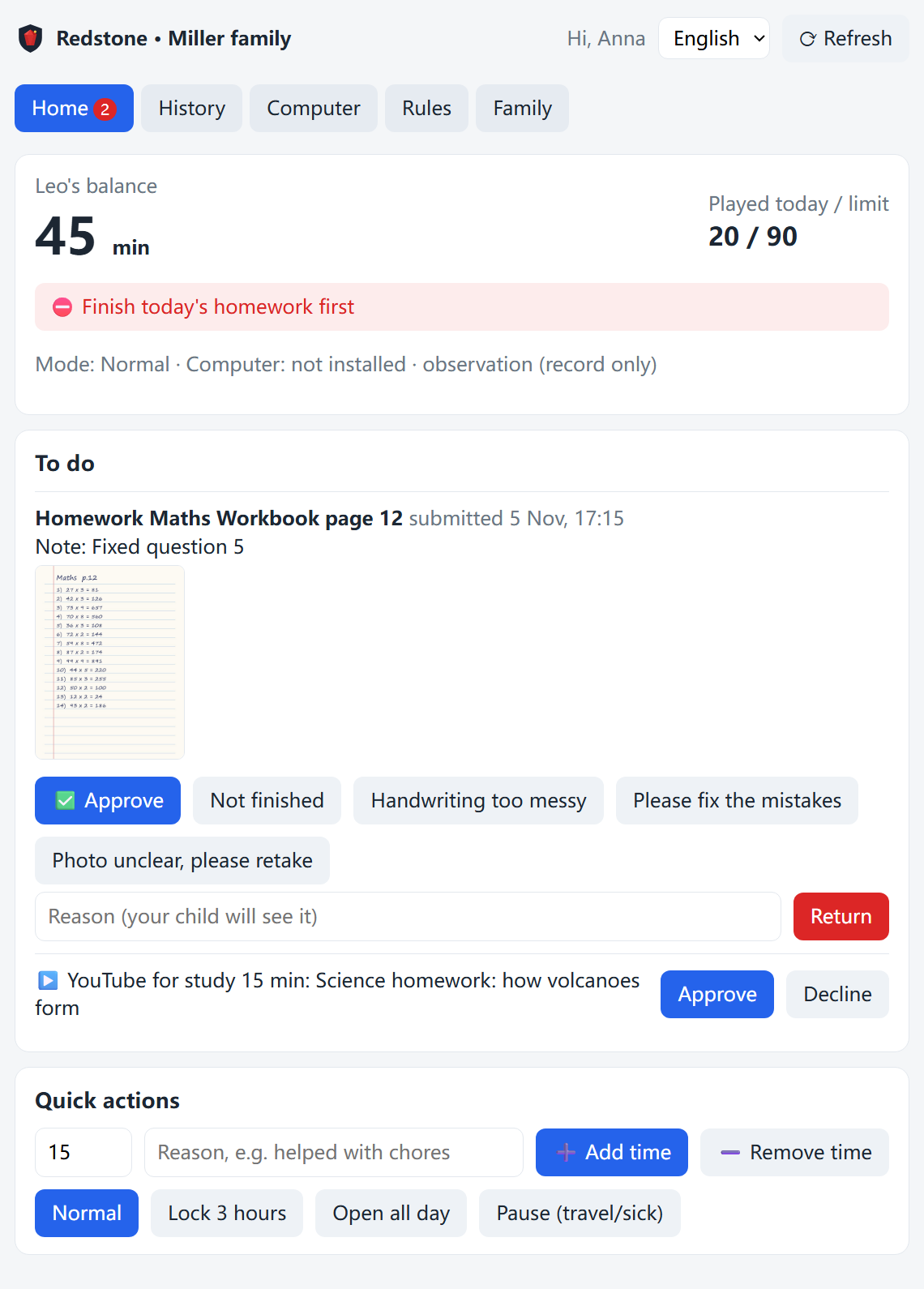
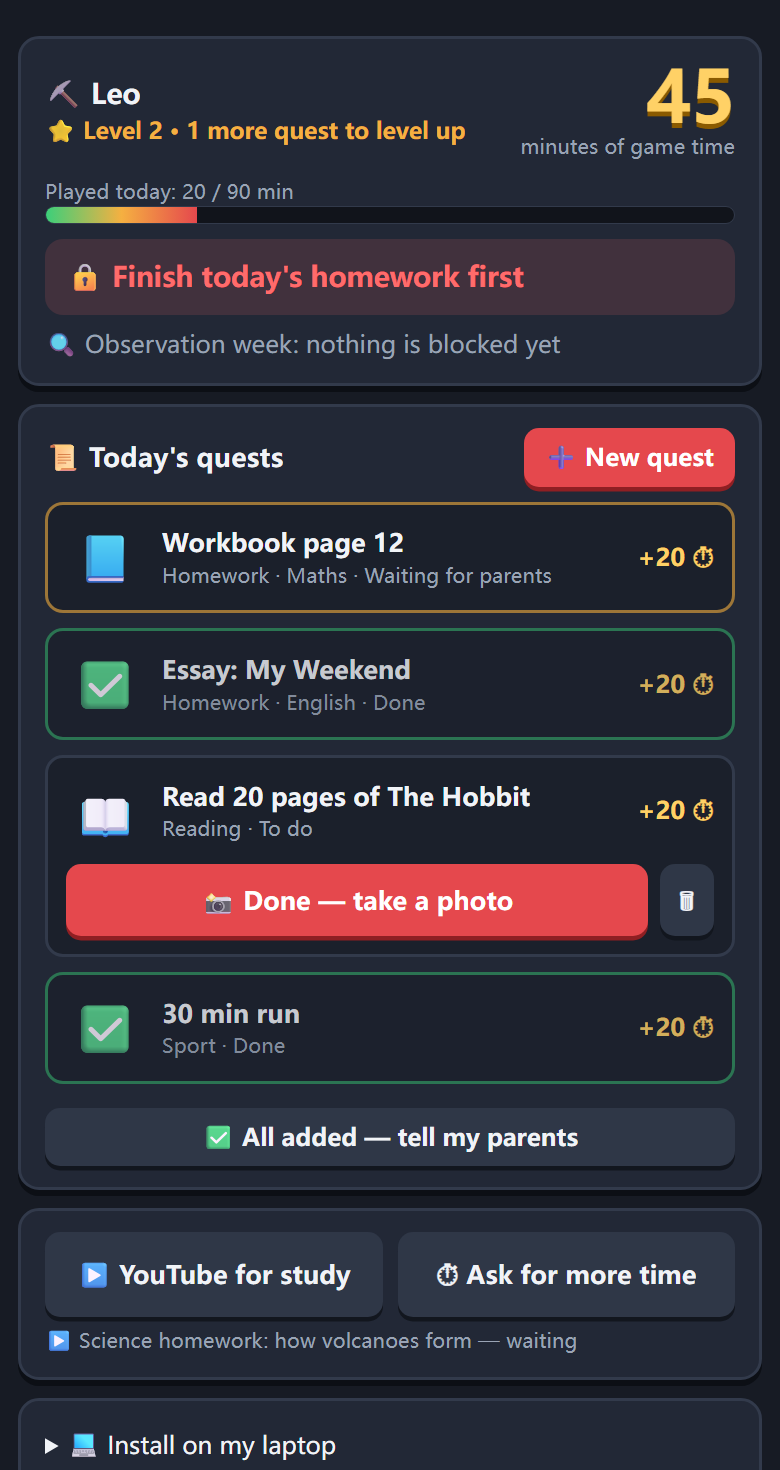
Redstone 把「做作业」变成「赚游戏时间」:孩子完成任务、拍照提交,家长在手机上一键验收,时间自动到账,到点自动提醒和关闭。不靠吵架,靠一起定好的规则。Redstone turns homework into earned game time. Kids finish a task and snap a photo, parents approve with one tap, time is credited automatically — with reminders and auto-stop when it runs out. Rules you agree on together, not arguments.

🇪🇺 数据存放在欧盟Data stored in the EU 🚫 无广告、不卖数据No ads, no data selling 🌐 中文 · English(保加利亚语即将推出)中文 · English (Български coming soon)
家长页面 孩子页面

很多家庭每天都在经历的事Sound familiar?

孩子要用电脑做作业,可电脑上同时也有游戏和短视频。Kids need a computer for homework — and the same computer has games and endless videos.

🎮

一打开电脑就停不下来"Just five more minutes"

本来要查资料,结果打开了游戏和视频,作业拖到深夜。A quick search turns into games and videos, and homework slips to midnight.

🗣️

口头约定没用,管多了伤感情Promises don't stick

每天为「还能玩多久」讨价还价,家长和孩子都很累。Daily negotiations over screen time leave everyone exhausted.

⏰

家长太忙,没法一直盯着Parents can't watch all day

普通的家长控制软件只会封锁,还要家长一条条手动设置和解锁。Typical parental controls only block things — and need constant manual unlocking.

三步,让规则自己运转Three steps. The rules run themselves.

家长定好规则以后,大部分事情都自动完成。Set the rules once; most of it runs automatically.

孩子录入今天的任务Kids add today's tasks

作业、阅读、运动、学语言……每完成一项都能换到游戏时间。Homework, reading, sport, languages — each one earns game time.

完成后拍照提交Snap a photo when done

用手机或电脑拍下作业,家长马上收到通知。One photo from a phone or laptop — parents are notified instantly.

家长一键验收,时间自动到账One tap to approve

游戏时间到了会提前提醒、留出保存时间,然后自动关闭游戏。Time is credited, reminders come before it runs out, and games close automatically.

为真实家庭设计的功能Built for real families

不只是「限制」,而是帮孩子一步步学会自己管理时间。Not just limits — a way for kids to learn to manage their own time.

⏱️

用学习换时间Earn your screen time

每类任务换多少分钟、每天最多玩多久、几点必须停,全部可以设置。Set minutes per task, daily limits and bedtime cut-offs.

💻

真正管住电脑游戏Real control on Windows

不只是网页:Minecraft 这类电脑游戏到时间也会自动关闭。Not just websites — desktop games like Minecraft close when time is up.

▶️

查资料可以申请Ask to use YouTube

需要用 YouTube 做作业?孩子说明用途,家长一键批准。Need YouTube for homework? Kids explain why; parents approve in a tap.

👨‍👩‍👦

父母一起管Both parents, one plan

任何一方都能审批;修改规则需要父母双方都同意。Either parent can approve; changing rules needs both.

🎯

像游戏一样有趣Feels like a game

任务卡、等级、完成庆祝,孩子愿意主动打开。Quest cards, levels and celebrations kids actually enjoy.

🤝

孩子也能参与规则Kids help set the rules

孩子可以提议修改规则,家长同意后生效,减少对抗。Kids can propose rule changes; parents decide. Less conflict.

🔔

通知不打扰Quiet notifications

只在需要你决定时通知;可以用网页,也可以连接 Telegram 一键审批。Only notified when a decision is needed — on the web or in Telegram.

🌍

多语言家庭Multilingual

中英文对照界面,学中文、保加利亚语也能换时间。Bilingual interface; learning Chinese or Bulgarian earns time too.

和普通家长控制软件有什么不同How Redstone is different

我们相信,孩子需要的不只是被管住,更是学会自己管理。Kids need more than restrictions — they need to learn self-management.

普通家长控制Typical parental controlsRedstone
思路Approach封锁和限时Block and limit完成任务换时间,先学习后娱乐Earn time by finishing tasks
家长的工作Parent effort经常手动设置、解锁Frequent manual unlocking定好规则,一键验收,其他自动Set rules once, approve in a tap
孩子的感受Kid's experience被监视、想办法绕过Watched, looking for loopholes规则透明、可以提议修改,有成就感Transparent rules, a voice, a sense of achievement
看什么What counts只看用了多久Minutes used作业有没有完成Whether homework got done

正在开发Coming next

下面这些功能还在开发中,首批体验家庭会最先用到,也会参与设计。These are in development. Early families get them first — and help shape them.

🤖

AI 作业助教AI homework helper

AI 指出哪里需要改、引导孩子自己想明白,而不是直接给答案。Points out what to fix and guides kids to the answer — instead of giving it away.

📚

用自己的课本出题Quizzes from your textbook

拍下课本,系统按章节出测验,测验通过也能换时间。Snap the textbook; get chapter quizzes that earn time.

🍎

更多设备More devices

目前支持 Windows 电脑,Mac 和 Chromebook 正在规划中。Windows today; Mac and Chromebook are planned.

孩子的数据,我们像对待自己孩子一样对待We treat your child's data like our own child's

我们自己也是用户家庭,所以这些是我们的底线。We're a user family too. These are our non-negotiables.

阅读完整的隐私说明 →Read the full privacy notice →

我们不想每天为了游戏时间吵架。所以我和儿子坐下来,一起把规则做成了一个系统。We didn't want to fight about game time every day. So my son and I sat down and turned our rules into a system. —— Redstone 创始人,一位爸爸— Redstone founder, a dad

由一位爸爸和他 14 岁的儿子一起打造Made by a dad and his 14-year-old son

Redstone 来自我们自己的家。我们住在保加利亚,家里说中文、英文和保加利亚语。儿子用电脑做作业,也很喜欢电脑游戏;我工作很忙,没办法一直盯着。口头约定试过很多次,效果都不好。

Redstone started in our own home. We live in Bulgaria and speak Chinese, English and Bulgarian. My son does homework on his laptop and loves computer games; I'm busy and can't watch all the time. Verbal agreements never lasted.

于是我们决定一起做一个工具:规则由全家一起商量,执行交给电脑。儿子是这个项目的联合创始人,参与定规则、测试和找漏洞。「Redstone」这个名字的灵感来自游戏里能把简单零件组合成自动化机器的「红石电路」。

So we built a tool together: the family agrees on the rules, and the computer enforces them. My son is a co-founder — he helps set rules, tests features and hunts for loopholes. The name "Redstone" is inspired by in-game circuits that turn simple parts into automated machines.

我们希望它也能帮到你的家庭。

We hope it helps your family too.

来自体验家庭的反馈From our early families

Redstone 正在首批家庭中试用。我们只会发布真实家庭的真实反馈——欢迎你成为其中之一。Redstone is being tried by its first families. We'll only ever publish real feedback from real families — you could be one of them.

申请成为体验家庭Become an early family

常见问题FAQ

适合多大的孩子?What ages is it for?

主要为 10–16 岁、开始独立用电脑做作业的孩子设计。

Designed for kids aged 10–16 who use a computer for homework.

需要什么设备?What do I need?

孩子的 Windows 电脑(安装一个小程序,约 2 分钟);家长用手机或电脑浏览器即可。Mac 和 Chromebook 正在规划中。

A Windows laptop for your child (a small app, about 2 minutes to install). Parents just need a phone or computer browser. Mac and Chromebook are planned.

孩子会不会想办法绕过?Won't kids find loopholes?

没有任何系统能做到 100% 防住。我们的做法是:孩子使用标准账号,程序由系统身份运行,孩子关不掉;同时鼓励孩子主动报告漏洞,报告还能换时间。很多孩子因此开始对技术感兴趣。

No system is 100% tamper-proof. Kids use a standard account and the app runs as a system service they can't close. We also reward kids for reporting loopholes — many end up curious about how technology works.

会不会让孩子反感?Will my kid resent it?

关键是透明和参与:规则全家一起定,孩子知道系统管什么,也可以提议修改。孩子做完作业能马上看到时间到账,比被唠叨好得多。

Transparency and participation matter. Rules are agreed together, kids know what is managed, and they can propose changes. Seeing time credited right away beats being nagged.

一定要用 Telegram 吗?Do I need Telegram?

不用。所有操作都可以在网页上完成;Telegram 只是可选的通知方式。

No. Everything works in the browser; Telegram is an optional notification channel.

收费吗?How much does it cost?

首批体验家庭免费使用。正式收费前我们会提前通知,并且给体验家庭优惠。

Free for early families. We'll give advance notice — and a discount — before any paid plan starts.

成为首批体验家庭Become an early family

目前采用邀请制。留下你的信息,我们会尽快发给你邀请链接。也欢迎直接给我们留言、提建议。We're invite-only for now. Leave your details and we'll send you an invitation. Questions and ideas are welcome too.

已经收到邀请?Already invited? 去注册 / 登录 →Sign up / sign in →